


Table of Contents
- Introduction
- How Display Technologies Actually Work
- LCD Panel Types (TN, IPS, VA)
- Advanced LCD: Mini-LED and Local Dimming
- Emissive Technologies: OLED & QD-OLED
- MicroLED: The Future Standard
- Key Buying Metrics Explained
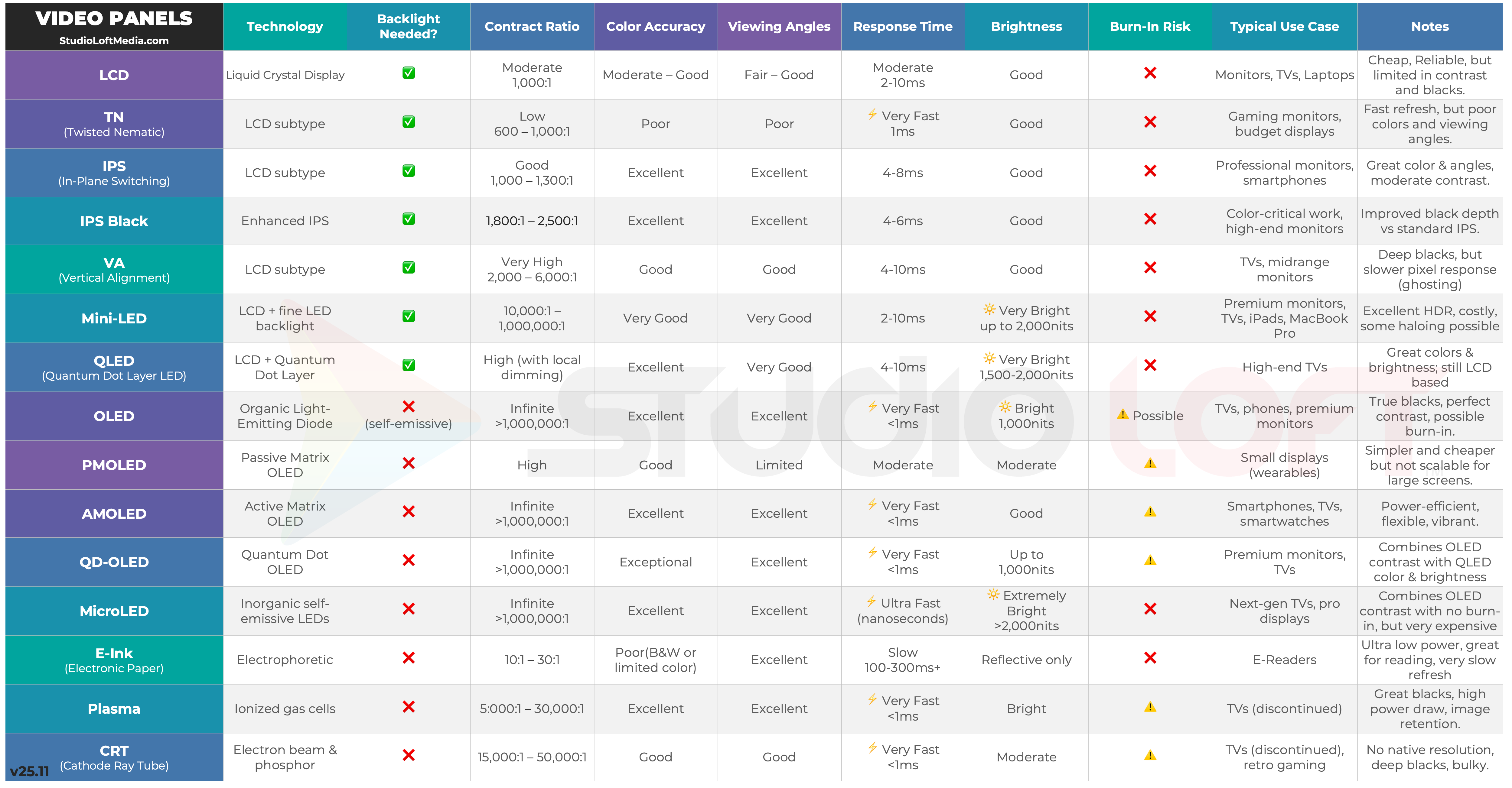
- Display Technology Comparison Tables
- Best Display Technology by Use Case
- Display Technology Decision Tree
- Final Thoughts
1. Introduction
Modern buyers face an overwhelming number of panel types, certifications, and marketing claims. Terms like QLED, NanoCell, TruBlack, and UltraContrast can obscure what really matters: the actual display technology that sits behind the glass.
This article is a practical, user-friendly display technology comparison designed to:
• Explain how each major panel type works
• Compare the strengths and weaknesses of LCD, IPS, VA, Mini-LED, OLED, QD-OLED, and MicroLED
• Map each technology to real-world use cases like gaming, creative work, home theater, and productivity
Understanding the core technology (not just brand marketing) is the single best way to choose a display that actually fits your workflow and environment.
2. How Displays Work: Transmissive vs. Emissive Panels
Every modern screen falls into one of two fundamental categories: transmissive or emissive.
Transmissive Displays (LCD)
LCD (Liquid Crystal Display) panels do not generate light themselves. Instead, they rely on a backlight that shines through multiple layers:
• Rear polarizer
• Liquid crystal layer (twists to modulate light)
• RGB color filters
• Front polarizer and protective glass
Pixels work by blocking or allowing light. Because light must be blocked rather than switched off:
• Blacks are never perfectly black (some light leaks through)
• Native contrast ratio is limited compared to emissive tech
• Response time depends on how quickly the crystals physically twist and untwist
• Local dimming is required to simulate “per-pixel” control for HDR
Transmissive technologies like TN, IPS, VA, and Mini-LED LCDs excel in brightness, cost-efficiency, and long-term stability, which is why they remain so common in monitors and TVs.
Emissive Displays (OLED, QD-OLED, MicroLED)
Emissive panels use pixels that emit their own light. There is no traditional backlight. This has several important consequences:
• A black pixel can be truly off → theoretically infinite contrast
• Response times are extremely fast (often <0.1 ms)
• Viewing angles are wide with minimal color or contrast shift
• HDR performance benefits from per-pixel brightness control
The tradeoffs:
• OLED and QD-OLED use organic compounds that can wear out and are susceptible to burn-in
• Emissive panels are more complex and usually more expensive
• Managing brightness vs. longevity is a key engineering challenge
Emissive technologies offer the best image quality overall, but they carry higher cost and more long-term image retention risks, especially for static UI elements.
3. LCD Panel Types (TN, IPS, VA)
Within the LCD family, most consumer displays are based on three main panel structures:
• TN (Twisted Nematic)
• IPS (In-Plane Switching)
• VA (Vertical Alignment)
Each behaves differently in terms of color, contrast, speed, and viewing angles.
TN (Twisted Nematic)
TN is the oldest and simplest LCD variant and is still favored in some esports and budget monitors.
How it works (simple version):
• Liquid crystals twist to control the polarization of light.
• Voltage changes quickly re-orient the crystals, allowing very fast changes in brightness.
Pros:
• Extremely fast response times (sub-1 ms on some gaming panels)
• Very low input lag
• Generally the cheapest option
Cons:
• Poor viewing angles (colors and contrast shift dramatically off-center)
• Lower color accuracy and coverage
• Weaker contrast than VA and emissive technologies
TN Panel Comparison Table
| Metric | Performance | Notes |
|---|---|---|
| Response Time | Excellent | Ideal for competitive esports |
| Input Lag | Very Low | Prioritizes speed over image quality |
| Color Accuracy | Poor | Unsuitable for creative/color-critical work |
| Contrast | Low | Typically ~700–1000:1 |
| Viewing Angles | Weak | Noticeable shift even with small head movement |
IPS (In-Plane Switching)
IPS is the most balanced LCD technology for general and professional use.
How it works:
• Liquid crystals rotate in the plane of the screen, improving control over light transmission and maintaining color stability across wide angles.
Pros:
• Excellent color accuracy and consistency
• Wide viewing angles with minimal color shift
• “Fast IPS” variants now offer very quick response times suitable for high-refresh gaming
• Common in creative, productivity, and premium monitors
Cons:
• Native contrast (~900–1300:1) is lower than VA
• IPS glow: subtle haze in dark scenes, especially at the corners in dark rooms
IPS Panel Comparison Table
| Metric | Performance | Notes |
|---|---|---|
| Color Accuracy | Excellent | Preferred for photo/video editing and design |
| Contrast | Moderate | Typically ~1000:1, improved in IPS Black variants |
| Viewing Angles | Wide | Color and contrast remain stable off-axis |
| Response Time | Good | Fast IPS is competitive with TN for gaming |
IPS Black is a newer refinement of IPS technology that improves native contrast (often approaching ~2000:1) and slightly reduces glow, making it particularly attractive for creatives and office use in mixed lighting.
VA (Vertical Alignment)
VA panels prioritize native contrast, making them strong for movie watching and dark-room use.
How it works:
• Crystals align vertically (blocking light) when “off” and tilt when voltage is applied, providing better light blocking in dark content.
Pros:
• Highest contrast among mainstream LCD technologies (often 3000–6000:1)
• Deep blacks (for an LCD)
• Very good for movies, TV, and general entertainment, especially in dim rooms
Cons:
• Slower transitions between some gray levels can cause dark smearing in fast content
• Viewing angles are better than TN but worse than IPS
• Color consistency can vary across the panel
VA Panel Comparison Table
| Metric | Performance | Notes |
|---|---|---|
| Contrast | High | 3000–6000:1 common on modern VA TVs |
| Black Levels | Good | Much better than TN/IPS in dark rooms |
| Motion Handling | Moderate | Some smearing in darker transitions |
| Color Accuracy | Good | Not as precise or stable as IPS |
| Viewing Angles | Moderate | Color/contrast shifts off-axis |
4. Mini-LED & Local Dimming (Advanced LCD)
Mini-LED is not a new panel type, but an advanced backlighting system for LCDs (IPS or VA).
Instead of a small number of large LEDs or edge lighting, Mini-LED uses hundreds to thousands of tiny LEDs grouped into local dimming zones:
• More zones = finer control of brightness across the screen
• Enables much higher peak brightness (often 1000–3000+ nits)
• Greatly improves HDR highlights and perceived contrast
However, because it’s still LCD, some limitations remain:
• Light is controlled in zones, not per pixel
• Bright highlights on dark backgrounds can cause blooming (a halo effect)
• Panel type (IPS vs VA) still influences overall contrast and viewing angle
Mini-LED Overview Table
| Attribute | Mini-LED LCD | Notes |
|---|---|---|
| Peak Brightness | Very High | Excellent for HDR and bright rooms |
| Contrast | High (with good zoning) | Still not per-pixel like OLED |
| Blooming | Possible | More zones = less blooming |
| Cost | Medium–High | Pricier than standard IPS/VA |
| Burn-in Risk | None (like typical LCD) | Great for static UI layouts |
If you need high brightness, good HDR, and no burn-in risk (e.g., bright living rooms, multi-use TVs, or dashboards), a Mini-LED TV or monitor is often the best compromise in today’s market.
5. Emissive Technologies: OLED & QD-OLED
OLED and QD-OLED are emissive technologies where each pixel emits its own light. This enables:
• Perfect blacks (individual pixels can turn completely off)
• Extremely high perceived contrast
• Very fast response times
• Superb HDR, especially in dark or controlled lighting environments
OLED (Standard / WOLED)
Most consumer OLED TVs and many monitors use WOLED (white OLED with color filters):
• White OLED subpixel emits light
• Color filters turn it into red, green, and blue
Pros:
• Perfect black levels
• Infinite contrast ratio in practical terms
• Near-instant response times (excellent motion clarity)
• Wide viewing angles with minimal color shift
Cons:
• Risk of burn-in or long-term image retention with static elements
• Peak brightness is improving but still typically lower than high-end Mini-LED in very bright scenes
• Brightness and lifespan management are handled via aggressive ABL (Automatic Brightness Limiting) and panel protection features
QD-OLED (Quantum Dot OLED)
QD-OLED uses a blue OLED emitter combined with a quantum-dot conversion layer for red and green, instead of traditional color filters.
Advantages vs. standard OLED:
• Higher color volume and a wider color gamut (approaching Rec.2020)
• Better efficiency (more light reaches your eyes)
• Higher peak brightness relative to similar WOLED panels
Drawbacks:
• Slight color fringing possible on fine text due to non-standard subpixel layout (especially noticeable at certain resolutions and scaling)
• Still uses organic emitters → burn-in and aging risks remain
OLED vs QD-OLED Comparison Table
| Feature | Standard OLED | QD-OLED |
|---|---|---|
| Black Levels | Perfect | Perfect |
| Peak Brightness | Good | Better at similar sizes |
| Color Gamut | Wide | Very Wide (near Rec.2020) |
| Burn-in Risk | Present | Present |
| Text Rendering | Standard | Possible fringing at small sizes |
If your usage involves static toolbars, HUDs, logos, or dashboards on-screen for many hours each day, you should carefully weigh the burn-in risk of OLED/QD-OLED against LCD/Mini-LED alternatives.
6. MicroLED — The Future Standard
MicroLED is often described as the “endgame” display technology because it combines the strengths of LCD and OLED with almost none of their weaknesses:
• Each pixel is an inorganic micro-LED
• Infinite contrast (per-pixel control)
• Extremely high brightness (often 2000–5000+ nits potential)
• No organic compounds → no traditional burn-in risk
• Very long lifespan (100,000+ hours)
Challenges in 2026:
• Extremely expensive to manufacture
• Difficult to scale to consumer pricing due to microscopic LED placement and yield issues
• Primarily seen in ultra-premium TVs, commercial signage, or modular video walls
MicroLED is the most technically advanced display technology currently available, but in 2025 it remains priced far above mainstream consumer budgets.
7. Key Buying Metrics Explained
To make a smart choice in any display technology comparison, it helps to understand the key specifications that actually affect real-world performance.
Peak Brightness (nits)
• SDR usage: 200–400 nits is usually comfortable
• HDR usage: 600–1000+ nits is recommended for impactful highlights
• Very bright rooms: Higher peak brightness (1000+ nits) helps combat glare
Native Contrast Ratio
• IPS: ~900–1300:1 (standard), up to ~2000:1 (IPS Black)
• VA: 3000–6000:1
• Mini-LED LCD: Effective contrast much higher due to local dimming
• OLED / QD-OLED / MicroLED: Practically infinite
Color Gamut Coverage
• sRGB / Rec.709: Good for standard/content creation for web
• DCI-P3: Preferred for modern HDR and cinema content
• Rec.2020: Ideal for high-end mastering and future-proof workflows
Color Accuracy and Calibration
• Look for Delta-E < 2 for color-critical work
• Hardware calibration support is a plus for professionals
• Uniformity compensation helps reduce shifts across the panel
Response Time and Input Lag
• Response Time: How fast pixels change color (GTG values)
• Input Lag: Total delay from input to on-screen result
Gaming priorities:
• Fast TN or Fast IPS for competitive players
• OLED/QD-OLED for max motion clarity, deep contrast, and response time
Burn-in and Longevity
• OLED / QD-OLED: Risk of retention with static content; mitigated by pixel shifting, screen savers, and cautious brightness settings
• LCD / Mini-LED: No burn-in; backlights dim gradually over many years
• MicroLED: Extremely robust lifespan
8. Display Technology Comparison Tables
This section summarizes the article with focused tables so you can quickly compare panel types.
LCD Family Overview
| Panel Type | Best For | Strengths | Weaknesses |
|---|---|---|---|
| TN | Esports / Budget Gaming | Ultra-fast, low lag | Poor color & angles |
| IPS | Creative / Productivity / General | Great color, angles | Moderate contrast, IPS glow |
| VA | Movies / Dark Room | High contrast, good blacks | Motion smearing, angles |
| Mini-LED LCD | HDR / Bright Rooms | High brightness, strong HDR | Blooming, higher price |
Emissive Family Overview
| Technology | Best For | Strengths | Weaknesses |
|---|---|---|---|
| OLED | HDR Movies / Gaming | Perfect blacks, instant response | Burn-in risk, lower full-field brightness |
| QD-OLED | HDR Cinema / High-End Gaming | Wider color gamut, higher brightness | Burn-in risk, text fringing |
| MicroLED | Flagship Home Theater / Pro Installations | Best of both worlds: bright, no burn-in | Very high cost in 2025 |
9. Best Display Technology by Use Case
This section helps map the display technology comparison to real-world usage.
For Creatives (Photo, Video, Design, Color Grading)
Recommended:
• High-quality IPS or IPS Black for stability and accuracy
• QD-OLED (or top-tier OLED) when HDR grading and deep blacks are priorities
Why:
• You need wide gamut (at least DCI-P3), low Delta-E, stable calibration, and good uniformity.
• Emissive displays offer unmatched contrast but require careful management for static UI.
For Gamers
Competitive Esports Players:
• Fast IPS or TN with 240–360 Hz
• Focus on input lag, response time, and motion clarity over contrast
Immersive / HDR Gamers:
• OLED or QD-OLED monitors or TVs
• Deep blacks and instant response massively improve perceived motion clarity and scene depth
For Home Theater & HDR Entertainment
Dark Room Theater:
• OLED or QD-OLED is the gold standard
• Perfect black levels and pixel-level dimming are unbeatable for movies and high-end series
Bright Living Room:
• Mini-LED TV with strong anti-reflection coating
• Higher peak brightness preserves impact in bright scenes and fights glare
For Productivity, Office Work & Reading
Recommended:
• IPS or IPS Black monitors for stable color and comfortable viewing angles
• Consider E-Ink secondary displays if you read long technical or textual documents frequently
Why:
• Long work sessions demand comfort, predictable behavior, and low visual fatigue.
• Burn-in risk on OLED may be a concern with static taskbars, docks, and toolbars.
10. Display Technology Decision Tree
Use this quick decision sequence to narrow down your options:
1 - Is competitive gaming your top priority?
• Yes → Look at Fast IPS or TN monitors with 240–360 Hz.
• No → Go to step 2.
2 - Is HDR movie/TV watching in a dark room your main use?
• Yes → Choose OLED or QD-OLED.
• No → Go to step 3.
3 - Will you use the screen in a bright room with lots of ambient light?
• Yes → Consider Mini-LED LCD for high brightness and HDR.
• No → Go to step 4.
4 - Do you do color-critical creative work (photo, video, design)?
• Yes → Choose IPS Black or high-end OLED/QD-OLED with calibration support.
• No → Go to step 5.
5 - Do you keep static UI elements on-screen all day?
• Yes → Favor IPS / VA / Mini-LED LCD to avoid burn-in.
• No → Emissive tech (OLED/QD-OLED) is safe to consider if budget allows.
6 - Is budget the deciding factor?
• Tight budget → IPS or VA monitor / TV.
• Flexible budget → Match tech to use case (often Mini-LED or OLED).
“Understanding display technology is the difference between choosing a screen that merely works—and one that transforms your workflow.”
11. Final Thoughts
In 2025, the world of displays can feel complex, but it becomes manageable once you understand the underlying technologies:
• TN for raw speed and budget gaming
• IPS for balanced performance, color accuracy, and productivity
• VA for strong contrast in movies and dark rooms
• Mini-LED for bright-room HDR with no burn-in risk
• OLED / QD-OLED for reference-level blacks and HDR in controlled lighting
• MicroLED as the long-term, high-cost “best of everything” endpoint
If you’re unsure and want a safe, future-friendly choice, a good IPS or Mini-LED display is the most practical all-rounder in 2025. For premium HDR experiences and cinematic immersion, OLED or QD-OLED still sit at the top of the image quality ladder.
)
Start the conversation